
Speak, connect, grow.

Talk with AI,learn Korean

Conversations with an AI teacher, grammar training and audio training. Build Korean you can actually speak, a little every day.

Download on the App Store

Free to download ・ For iPhone

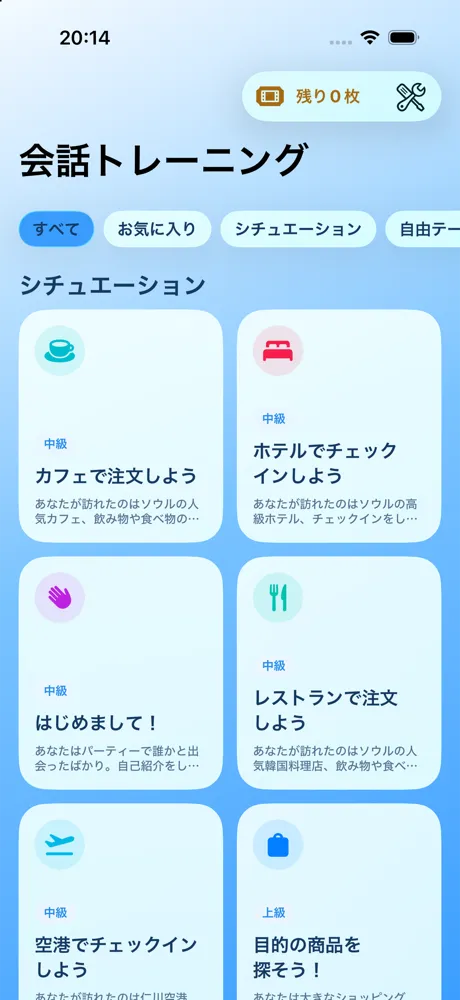
The list of conversation materials, with situations such as a café, a hotel and an airport
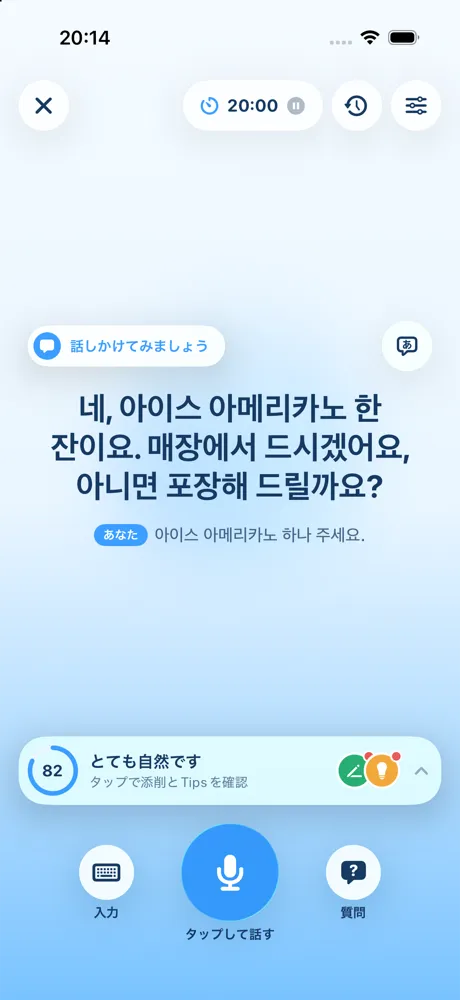
The AI conversation screen: the teacher speaks in Korean and your speech is scored
Sudani, the SUDA character

An AI teacher, any time

Speak as much as you like without feeling self-conscious.

Corrections and hints in Japanese

Ask in Japanese whenever you get stuck.

Track every day

Your study time and learning streak show how far you have come.

Learn Korean with AI conversation, grammar and audio

Speak, translate and listen. Three kinds of training for Korean you can use.

AI conversation

At a café or on a trip.Learn by talking it through

Practice Korean conversations with an AI teacher for each theme and situation.

  • Speak by voice or type on the keyboard
  • Get a score and corrections every time you speak
  • Ask in Japanese when you are unsure

More about AI conversation
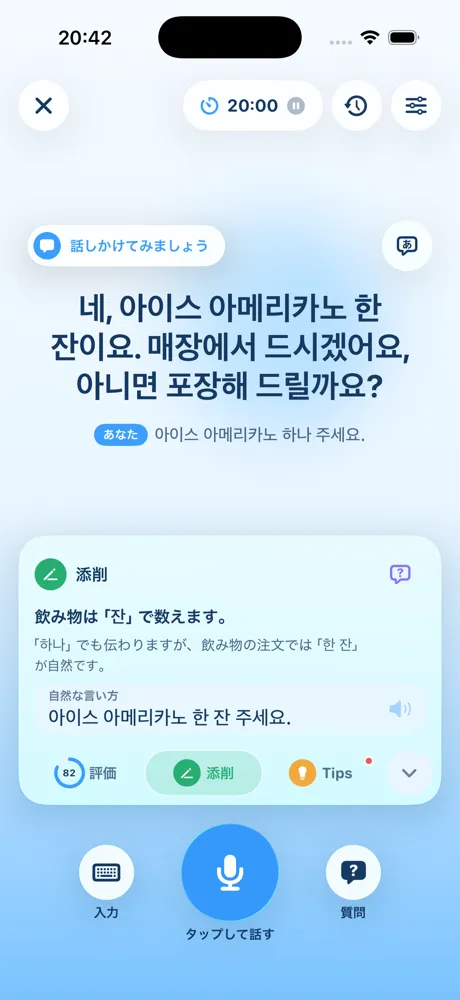
The AI conversation screen showing corrections and a more natural way to say what you said

Grammar training

Translate, correct,and make grammar stick

Translate Japanese sentences into Korean and the AI tells you whether you are right, with feedback.

  • Start with any lesson you like
  • The AI explains what is right and why
  • Review the questions you missed all at once
More about Grammar training

Audio training

Listen, say it out loud,remember the phrase

Listen-and-repeat lessons that teach Korean phrases out loud, guided in Japanese.

  • Guided in Japanese
  • Fits into chores and commutes
  • Start right away from "Audio" on the Home screen
More about Audio training

Learning record

See your progress,keep it going

The days you studied, your study time and the materials you worked on are recorded automatically.

  • Total study time and learning streak
  • Look back day by day in the study calendar
  • Link your Apple Account to keep it when you change devices

Plans

Start for free. Go Premium when you want more.

Free

Try it out for free

  • Free grammar and audio training lessons
  • Use tickets for other grammar lessons and AI conversations
  • Earn tickets by watching videos

Premium

Learn without worrying about tickets

  • Every grammar and audio training lesson
  • AI conversations without tickets
  • Everything in Free

Please check prices on the App Store.

FAQ

You can find more answers on the FAQ page.

See all questions
What is conversation training?

A feature for practicing Korean by talking with AI characters for each theme and situation.

Besides voice input with the microphone, you can also type on the keyboard. During a conversation you can ask questions in Japanese and check corrections.

What is grammar training?

Training where you translate a Japanese sentence into Korean, and the AI tells you whether it is correct and gives feedback.

You do not have to take the lessons in order. Start with any lesson you like. You can review the questions you got wrong all at once from "Review weak points" on the Home screen.

What is the difference between the Free plan and the Premium plans?

Free plan: Study the free grammar lessons, and unlock other lessons for 7 days with one ticket each. AI conversations use one ticket to start and one ticket to extend. In audio training, you can listen to Beginner Lesson 1. Banner ads are shown in the app.

Premium plan: Study every grammar and audio training lesson and have AI conversations, all without tickets. Banner ads are shown in the app.

Premium Plus plan: Includes everything in Premium and removes in-app banner ads.

On every plan, an AI conversation lasts 20 minutes and can be extended once.

What are tickets?

Tickets are items used on the Free plan. They unlock grammar lessons and are used for AI conversations.

Grammar: Unlock a lesson that is not free with one ticket, and you can study it as many times as you like for 7 days.

AI conversation: Use one ticket to start a conversation and one ticket to extend it.

Tickets cannot be used for audio training. Lessons other than Beginner Lesson 1 are available on the Premium and Premium Plus plans.

You can check how many you have under "Tickets" in the Settings tab. On the same screen, you can get more by watching videos (up to 3 per day) or by purchasing them (3 or 10 tickets).

You do not need tickets on the Premium and Premium Plus plans.

Start speaking Korean today

SUDA is free to download on the App Store.

Download on the App Store