AI conversation
Practice Korean conversation with AI
Order at a café, check in at a hotel, introduce yourself. With SUDA's AI conversation, you can talk in Korean with an AI teacher for each situation as often as you like, without worrying about making mistakes. You get a rating and corrections every time you speak, and you can ask questions in Japanese on the spot.

Highlights
Choose a situation or a topic
Eleven situations such as a café, hotel, airport and clinic, and eight topics such as work, hobbies and family. Pick the material that matches what you want to say.
A rating and corrections every time
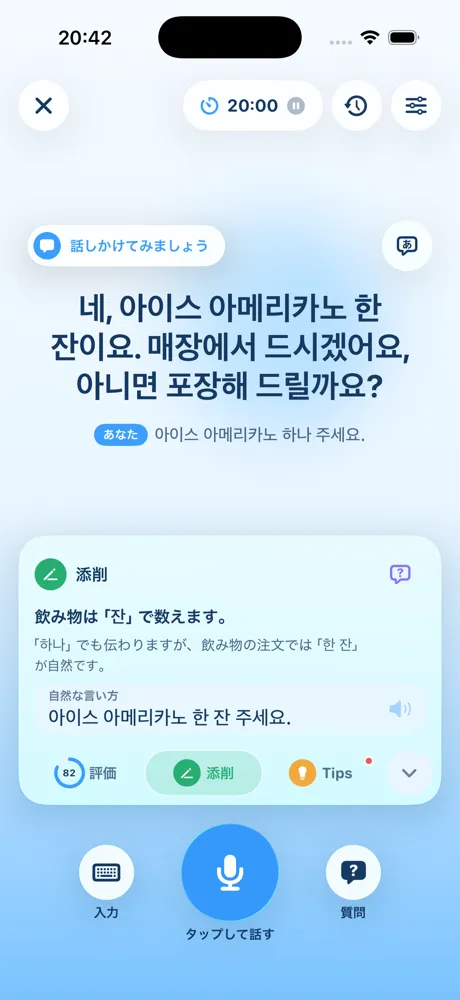
You get a rating of how natural your Korean sounds and a more natural way to say it, alongside the conversation. Check them later without breaking the flow.
Ask in Japanese when you are stuck
Open "Ask in Japanese" during the conversation to ask what something means or how to say it. Answers come in Japanese text and audio, with example sentences in Korean.
How it works
-
Choose a material
Pick a "Situation" or "Conversation topic" to practice. Each shows its level as beginner, intermediate or advanced.
-
Talk with the AI teacher in Korean
Press the mic and speak, or type and send. With "Auto conversation" on, recording starts after the teacher finishes, and your turn is sent when you stop talking.
-
Check the rating and corrections
Each time you speak, a rating, corrections and tips arrive. Tap them to see a more natural way to say it and key points.
-
Ask in Japanese when you are unsure
If you do not know how to say something, pause and ask in Japanese. After you hear the answer, go straight back to the conversation.
In detail
Talk with AI, so you can practice as much as you like
You get better at Korean conversation by actually speaking. With a human partner, though, it is easy to hold back because you are afraid of mistakes or of keeping the other person waiting.
In SUDA’s AI conversation, your partner is an AI teacher. Repeat the same situation as many times as you like, and take your time before answering. Even if you hesitate or fall back on Japanese, you can keep practicing without feeling awkward.
Situations and topics
There are two kinds of material: “Situations” you meet when traveling or living in Korea, and “Conversation topics” where you talk about yourself.
| Type | Examples |
|---|---|
| Situations (11) | Ordering at a café, checking in at a hotel, nice to meet you, ordering at a restaurant, checking in at the airport, requesting an in-flight meal, ordering a drink at a bar, finding a product, returning a product, seeing a doctor, expressing your feelings |
| Conversation topics (8) | Talk about your work, hobbies, family, favorite sports, music, books, hometown and food |
Conversation topics start at the beginner level, and situations are intermediate or advanced. We recommend getting used to talking about yourself first, then moving on to travel and everyday situations.
Speak or type
You can talk in two ways.
- Speak: Press the mic and talk in Korean. You can fix the recognized text before sending it.
- Type: When you cannot speak out loud, send text instead. Everything after sending works the same.
With “Auto conversation” on, recording starts automatically after the teacher finishes, and your turn is sent after a short pause. Choose the pause length from short, standard or long; set it to long if you like to think while you talk.
Learn natural phrasing from ratings and corrections
Every time you speak, you get a rating of how natural your Korean is, plus corrections and tips. They are created alongside the conversation, so the exchange with the teacher never stops.
Tap a card to see a more natural way to say it and how to use it. The conversation history lets you review that session’s exchanges, corrections and questions together.
Ask in Japanese and keep going
When you wonder what a word means or how to say something politely, open “Ask in Japanese” from the conversation screen. You can ask by voice or text.
The answer comes in Japanese text and audio, along with Korean example sentences you can use. Solve the problem on the spot and go right back to the conversation.
Combine with grammar and audio training
Phrases you could not say in conversation are easier to use next time if you practice them as translation exercises in grammar training. While commuting or doing chores, audio training lets you learn phrases by listening and repeating.
FAQ
Can I use it if I can barely speak Korean?
Yes. Conversation topics start at the beginner level, and you can ask in Japanese when you do not know how to say something. You can also type instead of speaking.
Can I hear the AI teacher's replies?
Yes. The teacher's replies are played as Korean audio. You can choose the teacher's voice before you start.
How long is one conversation?
One conversation lasts 20 minutes, and you can extend it if you want to keep going. The remaining time is shown on the screen.
Is it free?
The app is free to download. What you can use depends on your plan; see the plans on the Home page and the FAQ for details.
Other training
Start speaking Korean today
SUDA is free to download on the App Store.